Auto Tax Mode
In this mode, you can have PayPal automatically calculate the sales tax (or VAT) depending on your customer's location.
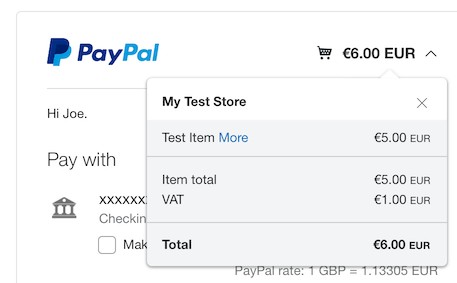
In PayPal auto tax mode, the tax amount passed to Payage by the calling application is ignored. The only tax amount used is the one applied by PayPal. It is passed back to the application so that the application can store it and use it for its reports. With PayPal auto tax, the amount requested by the application is the amount excluding tax. If the price of your item is 5 Euros and the tax is 20%, the customer pays €6.
If you use Auto Tax Mode you should also enable the PayPal Shipping Address fields to capture your customer's location. If not, PayPal uses the user's IP address location or credit card location.
PayPal auto tax mode does not handle the reverse charge method for EU business-to-business sales. If you need to implement EU VAT, Stripe auto tax mode is a much better choice.
The tax rates you setup in PayPal are only used when you have set Auto Tax Mode to "Yes" in Payage. When Auto Tax Mode is switched off in Payage, the tax amount provided by the calling application is used.
If you use Auto Tax Mode, we recommend that you do not use a Payage gateway fee, since the various calculations become very difficult to understand.
If you use PayPal in auto tax mode you cannot offer a choice of payment gateways to your customers because the tax treatment would be different depending on the customer's choice of gateway.
Setting Up Auto Tax Mode
To set the tax rates applied by PayPal, go to Account Settings, Payment Preferences, VAT (Set up sales taxes for multiple regions) and click Update. There you can set the tax rates for domestic and international payments by US state and for each foreign country. You have to maintain these tax rates yourself.