Encrypted Website Payments
EWP is a PayPal Payments Standard feature that uses public and private keys to encrypt the payment button code used on merchant websites. The encryption hides the payment details so they cannot be seen by anyone viewing the website source code in a browser.
It is perfectly safe to use Payage with Paypal without EWP. Payage makes exhaustive post-payment checks to ensure that the correct amount was actually paid. If a user attempts to alter the unencrypted button data, Payage will detect the change and fail the payment. However, using EWP completely removes any possibility of a user viewing or changing the payment button data. You can read more about EWP here:
https://developer.paypal.com/api/nvp-soap/paypal-payments-standard/integration-guide/encryptedwebpayments/#link-encryptedwebsitepaymentsewp
The Payage PayPal addon supports EWP as an option, but setting it up will be challenging for non-technical users. The following steps are described in detail on the PayPal page above.
- Generate a Private Key using OpenSSL
- Generate a Public Certificate using OpenSSL
- Upload your Public Certificate to your PayPal account
- Download the PayPal Public Certificate from your PayPal account
Payage needs access to all three files, so you will need to upload them to a folder on your server.
Payage also needs the Certificate ID of the certificate you uploaded to PayPal. After you upload your Public Certificate to your PayPal account, you will see the Certificate ID, in this case "AB12NSB4PZBYZ".
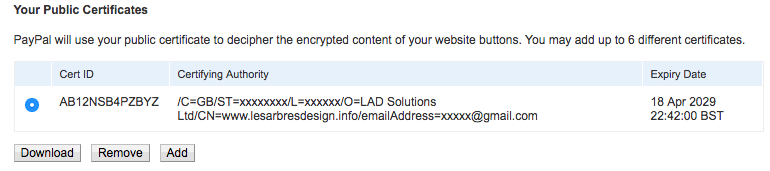
To access the certificate settings in your PayPal account, you can use this link:
https://www.paypal.com/cgi-bin/customerprofileweb?cmd=_profile-website-cert
On the Payage gateway configuration page, set "Use EWP" to Yes, and enter the Certificate ID and absolute paths of all three files on your server.
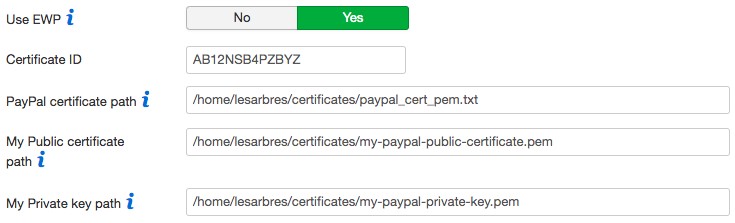
After you enable EWP, check that your PayPal payment buttons go to the PayPal payments page correctly, without showing any errors. If you got any part of the setup process wrong, clicking on a payment button will go to the PayPal site and display the error "There was a problem verifying the signature of your secure order. Please contact your merchant". The same error is shown regardless of the problem, and unfortunately there is no way to obtain more detailed information.