Making Test Payments
The Payage Test Component is very useful for making test payments when setting up a new system. Payage Test simulates an eCommerce application without the inconvenience of having to set one up, or go through the purchase process to reach the payment buttons.
To use the test component, create a menu item of type Payage Test. When you select the menu item on the front end of the site, you see a form that allows you to enter details of a payment to be made.
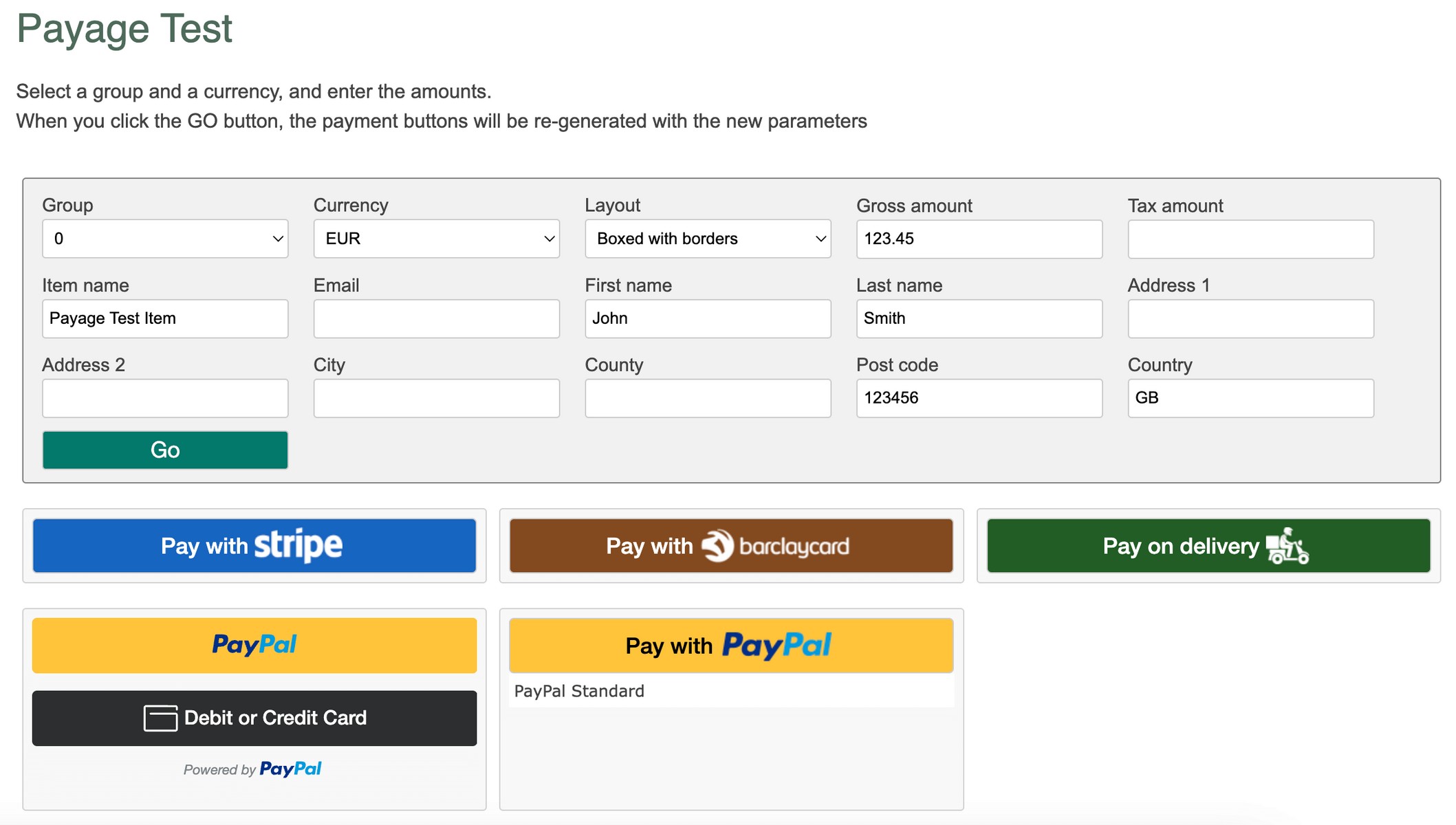
If accounts exist for more than one group, you can select from the available group numbers, with zero meaning all groups. If you select a non-zero group number, only buttons of the selected group number are displayed.
If accounts exist for more than one currency, you can select from the available currencies. Only buttons of the selected currency are displayed.
When you click Go, the payment buttons that match your group and currency selections are shown. The rest of the data is embedded in the button structure and will be passed to the payment gateway if and when you click the button. Not all gateways support all the data fields.
When you click on a payment button and make a payment, the browser returns back to the test page again after payment. The payment status is displayed once at the top of the page. If any notifications are subsequently received these are also displayed once at the top of the page, but note that updates are only shown when the page is re-displayed after you click the Go button. The page does not update automatically.
The Payage test page should never be made accessible to public users of your site.