The Payment Detail View
To view details of a payment, click on its date/time to enter the payment detail view. Payage captures and stores every detail of every message involved in the payment process. You won't normally need to look at these details but in case of any problems with a payment, it's very useful to have them stored here.
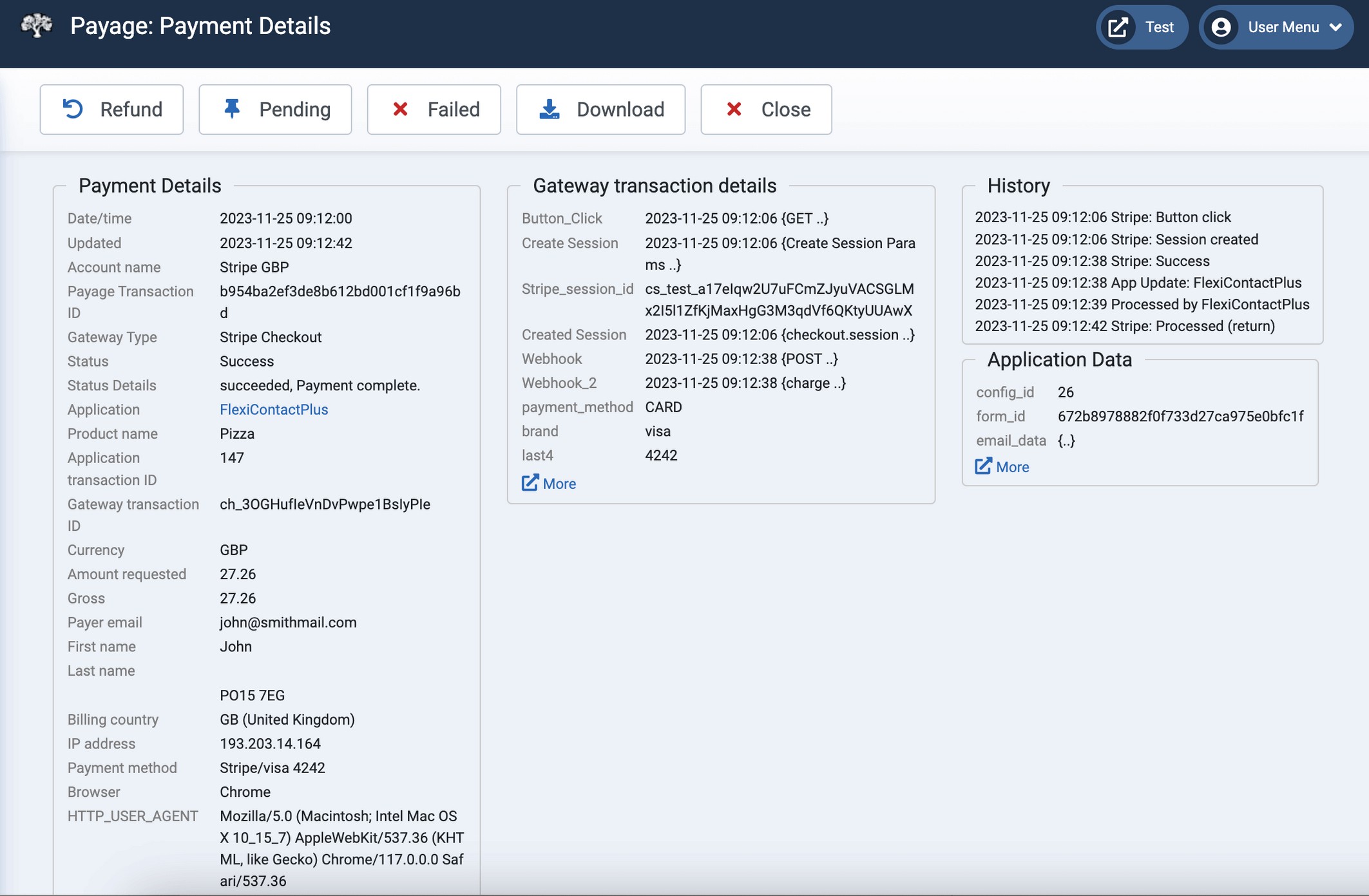
The payment detail page has four sections.
Payment Details
Shows details that are common to all payments regardless of which gateway type was used to make payment.
Gateway transaction details
Shows the raw fields from the last message received from the payment gateway. The details are different for each gateway type and are very detailed and technical. They are very useful for diagnostic purposes. You can view the entire detailed history of all the messages from the gateway by clicking on the "More" link, if there is one.
History
Shows the history of status changes for the transaction.
Application Data
Shows the data that was stored by the application when it made its original button request for this payment. These details may be useful for diagnostic purposes or to manually match the incoming payment with the application transaction. If the details include nested structures, clicking on the "More" link will show the entire structure.
The %APP_xxxxx% invoice variable can retrieve any numeric or text value from here. For example, for a MediaShop transaction you would see the DOWNLOADS and EXPIRY values here, which are retrieved by %APP_DOWNLOADS% and %APP_EXPIRY%.
Payment Statuses
Payments in Payage can be in one of four statuses:
- Success. Payment was made successfully.
- Pending. Payment has been made but has not yet cleared.
- Failed. Payment failed for some reason that should be shown in the Status Details field of the Payment Details section.
- Refunded. Payment has been refunded to the customer.
Payment status can be updated by notifications from the payment gateway. Support for this varies by gateway.
Buttons are provided to manually change the status of the payment if necessary. Status changes are propagated to the application associated with the payment. The application may or may not choose to update the status of the associated application transaction.
Country Information
The Payment Details section can show several different kinds of country information. It's possible for all three countries to be different.
- The Billing Country is the country entered by the buyer in the originating application.
- The IP Country is the country identified from the buyer's IP address. At the current time only MediaShop provides this.
- The Payment Country is the country notified by the payment gateway.
Download Payment Details
The download button on the payment detail view downloads the entire payment details record to a text file on your computer. If you experience a problem with a transaction we might ask you to send us this file for diagnostic purposes. It's a plain text file, so you can edit it to mask any sensitive data before sending it to us.