Trace Mode
Payage has a built-in trace feature, which is mainly used for resolving complex problems. If you contact us with a problem, we will sometimes ask you to send us a trace. Of course there is nothing to stop you examining the trace yourself before contacting us. You might be able to spot the cause of the problem yourself.
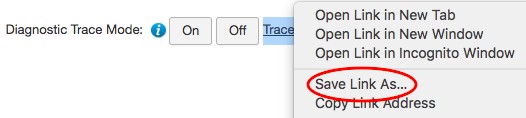
To obtain a trace, in the administration interface, go to the Payage: About page. At the bottom of the page are two buttons. Click the On button. A link to the trace file is displayed, but don't download the file yet.

Now perform the steps required to reproduce the problem. Everything should work the same way except that diagnostic information is being written to the trace file.
Now go back to the About page and download the trace file.
Once you have downloaded the trace file, click the Off button to switch tracing off. The trace file will be deleted. Active trace files might be accessible over the web and might contain live contact information, so it's important to switch tracing off after use.
Please send trace files to us as attachments. Please don't paste the contents into an email.