"Incorrect String Value For Column" Error
This is a database error that occurs when an attempt is made to insert data containing characters that are not supported by the default character set of a database table.
One possible cause of this problem is trying to insert 4-byte UTF-8 characters into a database table with a default character set of utf8 or utf8mb3. Payage attempts to prevent this problem by creating its tables with a default character set of utf8mb4, and further, by attempting to convert its tables to utf8mb4 during installation, using the following queries (where '#_' is the database prefix for your site):
ALTER TABLE #__payage_accounts CONVERT TO CHARACTER SET utf8mb4 COLLATE utf8mb4_unicode_ci
ALTER TABLE #__payage_payments CONVERT TO CHARACTER SET utf8mb4 COLLATE utf8mb4_unicode_ci
ALTER TABLE #__payage_syslog   CONVERT TO CHARACTER SET utf8mb4 COLLATE utf8mb4_unicode_ci
This problem could still occur if your database configuration settings are incorrect. You can check these by running the following query in PhpMyAdmin:
SHOW VARIABLES LIKE 'character_set_%';The results should confirm that the system is configured to use utf8mb4:
character_set_client utf8mb4
character_set_connection utf8mb4
character_set_database utf8mb4
character_set_results utf8mb4
character_set_server utf8mb4
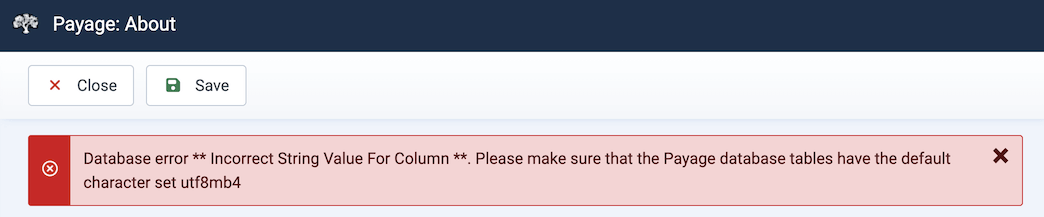
The Payage About page also checks that 4-byte data can be inserted into the Payage tables. If the test fails, an error is shown:
The "Incorrect String Value For Column" error can also be caused by a payment gateway returning data in a character set other than utf8. For the PayPal Standard gateway, it's very important to set your PayPal account to use utf8 as described in the PayPal Standard section of this guide.
For more information about this complex error, please see this post:
https://stackoverflow.com/questions/10957238/incorrect-string-value-when-trying-to-insert-utf-8-into-mysql-via-jdbc