The Payment List View
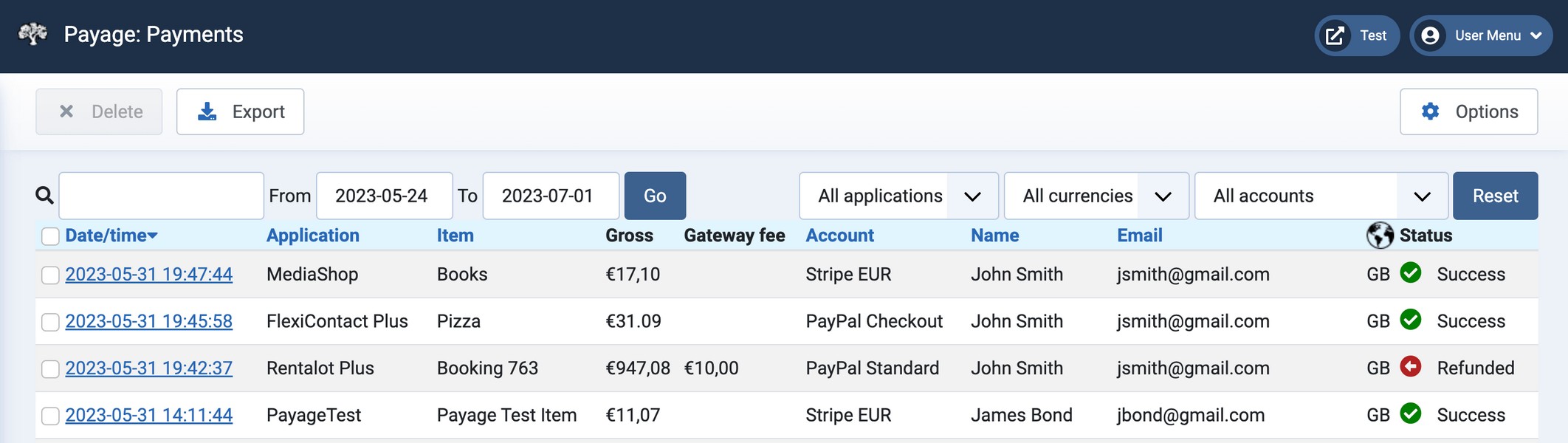
The payments list page shows all your payments and allows you to search them, delete them, and view details.
Some of the columns and filters on the payment list are dynamic so your list might not look quite like this one.
Searching and Filtering
You can filter the payments shown by date, application, currency, and account. You can also search for payments by date (YYYY or YYYY-MM or YYYY-MM-DD), payer name, payer email address, product name, Payage transaction id, gateway transaction id, or invoice number.
Deleting Payments
You can delete one or more payments by checking their check box in the list and clicking the delete button. Deleting a payment in Payage does not delete the associated transaction in the application, nor at the payment gateway. It merely deletes Payage's record of the payment. Once a payment has been deleted, Payage will no longer be able to record any updates to the payment that might come from the gateway, nor pass the updates on to the application. Deletion is permanent; there is no trash or undelete option.
Exporting Payments
The export button downloads a Comma Separated Variable file "payage_payments.csv" to your computer containing details of all the payments in the payment list, as selected by the current settings of the filters and/or the search box. Most computers will open .csv files in a spreadsheet program.