Extra Javascript
If you know Javascript there are many ways to enhance Google Charts. The Javascript you enter in the Extra Javascript field is added to the chart script just after the data table has been built, just before the draw function is called. The Google Charts API provides many functions for manipulating the chart data and the chart itself. You can access the data table and the chart object. For example, if the chart ID is 9, the chart is referenced as "window.plotalot_chart_9", and the data table is referenced as "window.plotalot_chart_9_data".
Adding a Formatter Function
You can add a formatter function to assign a custom format to a data column. In this example we will add a '%' suffix to the value of the Sample Gauges chart, using the NumberFormat function documented here:
https://developers.google.com/chart/interactive/docs/reference#numberformatter
Assuming the chart ID is 9, here's the code you would add to the Extra Javascript field:
var formatter = new google.visualization.NumberFormat({suffix:'%',pattern:'#'});
formatter.format(window.plotalot_chart_9_data, 1);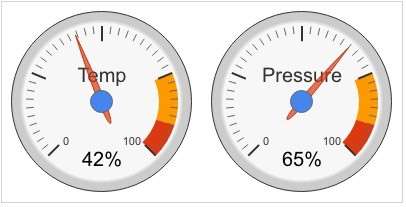
Adding an Event Handler
In this example we will use Extra Javascript to add an event handler to the Sample Organisation Chart. The event handler copies the selected name to a global variable for use by some external Javascript.
google.visualization.events.addListener(window.plotalot_chart_20, 'select',
function()
{
    if (window.plotalot_chart_20.getSelection().length)
    {
        var item = window.plotalot_chart_20.getSelection()[0];
        var row = item.row;
        window.selected_name = window.plotalot_chart_20_data.getValue(row, 0);
        alert(window.selected_name);
    }
}
);