Gauges
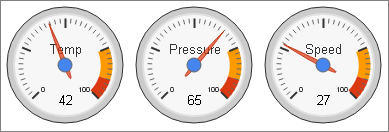
Gauges show a single value. Each row of the dataset draws a single gauge.
| Query Requirements |
First Column: Text Second Column: Numeric The query must return two columns, the first being the gauge name, and the second being the value. |
| Multiple Plots |
No Gauges only show a single data series. |
| Axis Overrides |
Y Axis The Y axis limits are used to set the range of the gauges. If not specified, the default range is 0 - 100. |
| Data Formatting |
No Gauge values are always shown as integers. |
| Extra Columns |
No The API does not support any extra columns for gauges. |
Yellow and Red Zones
You can set these using the extra options field. In the example above, the following extra options are specified:
,redFrom:90, redTo:100, yellowFrom:75, yellowTo:90, minorTicks:10
Refer to the Extra Option section for more details about the syntax.