Extra Columns
For some chart types, the Google Charts API supports extra columns that tell the API more about how to draw a chart. The Google documentation calls this feature "DataTable Roles":
https://google-developers.appspot.com/chart/interactive/docs/roles
Plotalot allows you to specify which extra column types your query will return, and will then pass the data to the API in the correct format.
The extra columns supported by Plotalot are:
| Name | Data type |
|---|---|
| annotation | string |
| annotationText | string |
| certainty | number (0=false, 1 = true) |
| emphasis | number (0=false, 1 = true) |
| interval | number |
| scope | number (0=false, 1 = true) |
| tooltip | string |
| style | string |
Example 1 - Bar Chart Annotations
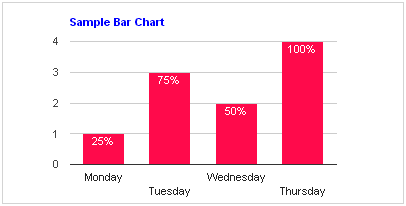
Let's add some annotations to the Sample Bar Chart. First we specify one extra column, "annotation". This tells Plotalot that our query will supply one additional string column after the two normally returned for a bar chart. Plotalot will now require that your query returns three columns.
Then we'll add the extra column to the sql. For this example the values are hard coded, but of course you can use any combination of SQL functions to calculate and format the values. Note that since the annotation data type is "string", the query must return the column value as a string.
    SELECT 'Monday', 1,'25%'
    UNION SELECT 'Tuesday', 3,'75%'
    UNION SELECT 'Wednesday', 2 ,'50%'
    UNION SELECT 'Thursday', 4, '100%'
Here's the result:
Example 2 - Annotations on a Line Chart
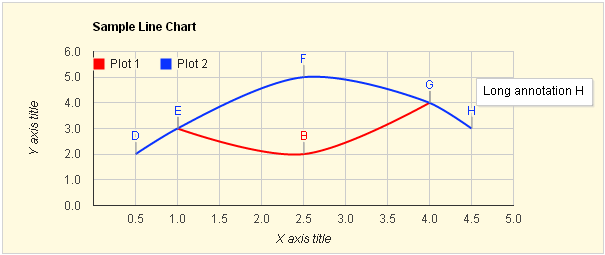
Now we'll add two extra columns to the Sample Line Chart. We will specify "annotation, annotationText" (without the quotes) in the Extra Columns field. This tells Plotalot that our query will supply two extra columns after the two normally returned for a line chart. Plotalot will now require that your query returns four columns.
The first extra column is the annotation that will appear on the chart, and the second is the contents of the tooltip that shows when you hover the mouse over the annotation. Here's the new sample data:
Plot 1:
    SELECT 1, 3, 'A', "Long annotation A"
    UNION SELECT 2.5, 2, 'B' , "Long annotation B"
    UNION SELECT 4, 4, 'C', "Long annotation C"
Plot 2:
    SELECT 0.5, 2, 'D', "Long annotation D"
    UNION SELECT 1, 3, 'E', "Long annotation E"
    UNION SELECT 2.5, 5, 'F', "Long annotation F"
    UNION SELECT 4,4, 'G', "Long annotation G"
    UNION SELECT 4.5,3, 'H', "Long annotation H"
Here's the result, hovering the mouse over annotation H.
Example 3 - HTML Tooltips
Let's add some tooltips to the sample line chart.
- We need to add the extra column "tooltip".
- We also need the extra option ",tooltip: {isHtml: true}".
Here's the data for one of the rows:
    UNION SELECT 2.5, 5,'<strong>Hello</strong><br />X=2.5 and Y=5.0<br />
    <img src="/images/smile.png" alt="">'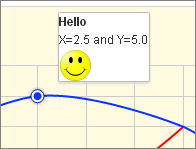
Example 4 - Style
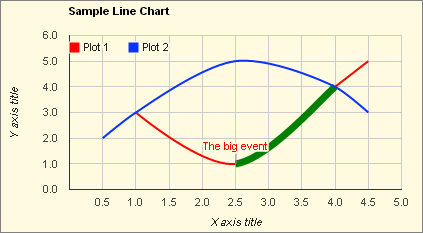
The style role can change the styling of bars, lines and data points. In this example we added the style "stroke- width:7; stroke-color:green" to one of the data points.
We also added an annotation "The big event" to the previous data point.