Axis Options
X and Y Axis Titles
The X and Y axis titles are optional labels that you can add to the chart. They can be fixed text, or the results of SQL queries.
Axis Start and Axis End
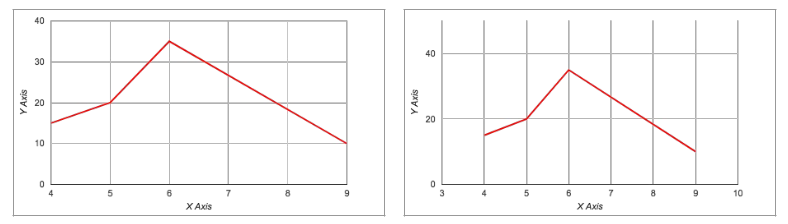
If you leave the axis start and axis end options blank, the chart axes are determined automatically. The axis start and axis end options can be used to extend the chart's visible range. Here's a small dataset to illustrate.
| X | 4 | 5 | 6 | 9 |
| Y | 15 | 20 | 35 | 10 |
The chart on the left does not specify axis limits, so they have been set automatically. The chart on the right sets the X axis limits at 3 - 10 and the Y axis limits at 0 - 50:
You can specify the limits as fixed numbers, or the result of SQL queries.
If the plot data extends outside the specified limits, Plotalot ignores the specified values and use the limits of the actual data instead. In such cases a warning is shown in the chart editor (warnings are never shown on the front end of the site). You can use this feature to set "preferred" axis values, which dynamically extend when necessary. Let's add a new row to the dataset above, X = 10, Y = -15, but keep the axis limits set the same as in the right hand chart above.
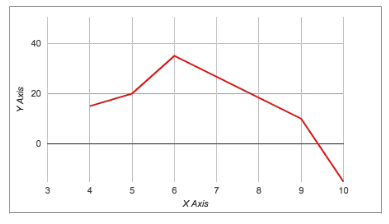
Now Plotalot generates a warning in the chart editor:
Y start [0] > first Y value in data [-15]
And extends the Y start value to -15.
More About Data Ranges
Plotalot analyses the data returned by the query (or queries) to determine the axis ranges for the chart. You can also extend the range of the chart using the axis range options.
For charts with multiple plots, the axis ranges of the chart are the entire range of all the data returned by all the plots. For example, this chart shows temperature readings for two different years. The X axis range covers the whole two years:
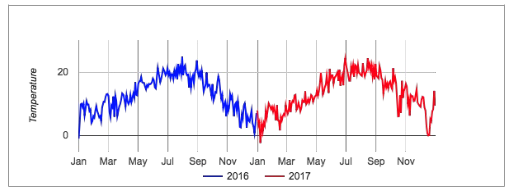
In this case, we can "trick" Plotalot into plotting both years on top of each other by arranging the queries so that they both return dates in the same date range. For example, you could add a year to the dates returned by one of the plots:
SELECT UNIX_TIMESTAMP(CAST(DATE_ADD(date, INTERVAL 1 YEAR) AS DATETIME)),...
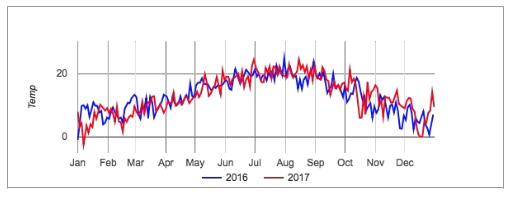
If you use this trick, you will probably need to switch off the tooltips because the values shown in them may not make proper sense. You can do this with the "enableInteractivity" extra option.
X Labels and Y Labels
These options determine the number of labels and gridlines on each axis. The default is -1, which means that the number of labels will be decided automatically, which is useful if the data is very variable and the number of labels needs to be dynamic. To set a fixed number of labels, specify an integer greater than zero.
Label Formats
These options determine the format of the axis labels.
Numeric Label Formats
The numeric formats ("99,999.9" etc) format numbers using the thousands and decimal separators of the user's browser locale.
There is an exception to this for pie charts with values. For pie charts only, the numeric values are formatted by Plotalot on the server, which does not know the user's browser locale. So for the Y axis formats, you will notice that there are more numeric formats ("99,999.9", "99 999,9", etc). For most charts there will be no difference between "99,999.9" and "99 999,9". But for the numeric values of pie charts, there will.
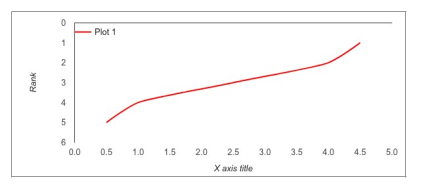
Inverted Axes
Most chart types have a "vAxis.direction" option:
https://developers.google.com/chart/interactive/docs/gallery/linechart
You can use this in the chart's Extra Options (see below) to make charts with inverted axes. For example:
,vAxis:{title:'Rank',gridlines:{color:'transparent',count:7},format:"#,##0",direction:-1}
Date Label Formats
The date and time options require the source data to be a Unix timestamp. For example, a query for a chart of temperatures for a range of dates might be:
SELECT UNIX_TIMESTAMP(Date), Value FROM Temperature_History
You can then use any of Plotalot's date or time formats to format the X axis labels.
The date and time format options only work correctly if the data value being formatted is a true Unix DateTime value, that is, the number of seconds since the 1st of January 1970. They won't work correctly for any other type of date or time value. You need to make sure your SQL query returns date/times as Unix DateTimes.
Custom Date Format
One of the X label formatting options is "Custom Date". When you select it, a field appears for you to enter a custom date format, according to the rules given here:
https://unicode-org.github.io/icu/userguide/format_parse/datetime/#date-field-symbol-table
For example: "yy-MM-dd hh:mm". The custom format only works for dates and times. You can't use it to format ordinary numbers.
Plot Options
Some types of chart can only show one data series, for example pie charts. But line graphs and bar charts can show several sets of data on the same graph. For these charts, Plotalot lets you specify multiple plots.
To change the number of plots, just change the number of plots in the Chart Options and click Save.
Each plot has four or five properties.
| Name | The name is used as the legend label for the plot. It can be text or a SQL query. |
| Colour | The colour used for the plot. If you leave this blank the colour is decided automatically. |
| Style | Options for the lines on line graphs and the colouring of pie charts. |
| Enable | Enable toggles the plot between enabled and disabled modes. Disabled plots are not drawn. |
| Query | The large text area is where you write the SQL query that returns data for the plot. |