Plugin Variable Chart ID
When you call the plugin, you normally specify a Chart ID like this:
{plotalot id="68"}If you specify a non-numeric Chart ID, the plugin retrieves the value as a Get or Post variable. For example:
{plotalot id="chart_id"}Retrieves the value of the "chart_id" variable. You could pass the "chart_id" parameter on a URL, like this:
http://www.mysite.com/my-charts?chart_id=68Selecting a Chart From a List
You can use a variable chart ID to create a select list of charts in an article:
<form action="" method="get">Select an Area<br />
<select name="cid" size="1" onchange="this.form.submit()">
    <option value="0">Select an Area</option>
    <option value="38">Europe</option>
    <option value="39">North America</option>
    <option value="40">South America</option>
    <option value="41">Asia</option>
    <option value="42">Australia</option>
</select>
</form>
{plotalot id="cid" error_txt=" "}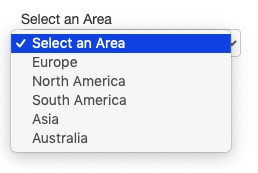
There are a few things to explain here:
- The "onchange" attribute submits the form automatically when a selection is made.
- The select list sends back a Get parameter, "cid", containing the selected chart ID.
- The chart ID in the plugin call is "cid", so the plugin will use the value of "cid" as the chart ID.
- The first time the article is opened, "cid" will be empty, so to avoid an error, we added the error_txt parameter with a single space, so that nothing is shown.