Bubble Charts
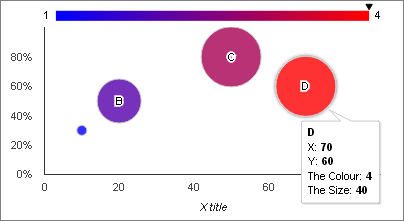
Bubble charts can represent XY data with size and colour showing two additional dimensions
| Query Requirements |
Column 1: Text - the name of the bubble Column 2: Numeric - the X coordinate Column 3: Numeric - the Y coordinate Column 4: Text or Numeric - the series or the colour Column 5: Numeric - the size of the bubble The query must return all five columns. The type of column 4 determines if the chart is a "series" bubble chart or a "gradient-colour" bubble chart. |
| Multiple Plots |
No Bubble charts only show a single data series. |
| Axis Overrides |
Both X and Y You can override the automatic axis limits calculated from the data series and extend the axes to values of your choice. |
| Data Formatting |
Both X and Y You can apply formatting to the X and Y axis labels. For example if the X axis data represents Unix time (seconds since 1st January 1970), you can use the formatting options to display many different date or time formats. |
| Extra Columns |
No The API does not support any extra columns for bubble charts. |
Column 1 can be an empty string if you don't want the bubbles to have names.
Column 4 can be 0 or an empty string if you want all the bubbles to be the same colour.
Column 5 can be 0 if you want all the bubbles to be the same size.
The column names of the Query determine the data names shown in the tooltips.