Pie Charts and Donut Charts
| Query Requirements |
Column 1: Text Column 2: Numeric The query must return two columns, the first being the slice label text, and the second being the value. The text column is used to name each slice of the pie chart. You can use SQL string formatting functions to manipulate the label text to your requirements. |
| Multiple Plots |
No Pie charts can only show a single data series, where each slice represents one data value. |
| Axis Overrides |
No The axis limit modifiers are not used for pie charts. The data values are always treated as proportions of the total value of all the rows in the dataset. |
| Data Formatting |
Yes You can use Plotalot's Y format selector to format the numeric values. |
| Extra Columns |
Yes tooltip |
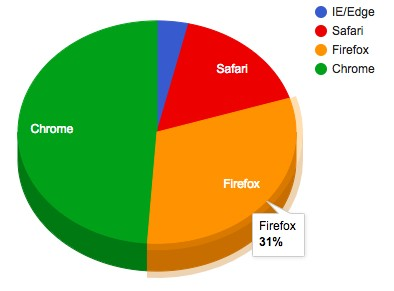
Pie charts can be 2D or 3D, with or without values. The with values option appends the Y value, in brackets, to the slice label text.
The text shown on the slices can be none, the actual value, the calculated percentage of the whole, or the label.
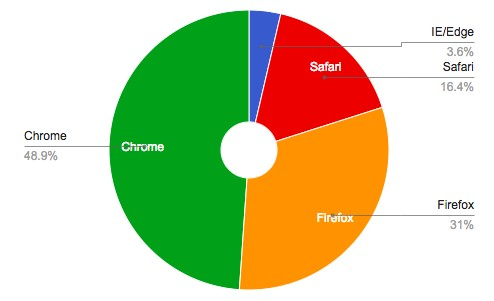
Donut Charts (pie charts with a hole in the middle) can be created using the pieHole option. The example chart above has the Extra Option ",pieHole: 0.2".