Using GET and POST Data
You can tell the Plotalot plugin to retrieve data values from Get or Post variables, by specifying their names with a leading underscore. For example:
{plotalot id="nn" P1="_temperature"}Passes the value of the Get or Post variable "temperature" as the value of plugin parameter P1.
Get Variable Example
Make a gauge chart with this SQL:
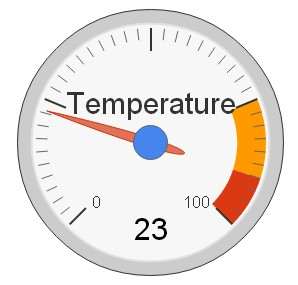
SELECT "Temperature", %%P1=0%%P1 is a plugin variable with a default value of zero. In the chart editor, the gauge shows zero. Now make an article with this plugin call:
{plotalot id="nn" P1="_temperature"}Where nn is the id of the gauge chart. Make a menu item to access the article, and look at the article on the front end of your site. The gauge still shows zero. Now add the temperature parameter to the article URL:
http://mysite.com/index.php/plotalot-test?temperature=23The plugin retrieves the "temperature" variable from the URL, and sets it as the value of P1. The SQL statement now returns 23 as the second column of the query, and the gauge shows this value.
Post Variable Example
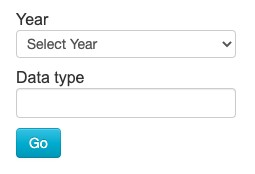
It is possible to construct forms in Joomla articles, although you do need to disable your wysiwyg editor to do so. Build an HTML form in an article, like this:
<form action="" method="get">Year<br />
<select name="year" size="1">
    <option value="2019">2019</option>
    <option value="2020">2020</option>
    <option value="2021">2021</option>
    <option value="2022">2022</option>
</select>
<br />Data type<br /><input type="text" name="column_name" size="15" >
<br /><input type="submit" value="Go" class="btn btn-info">
</form>
{plotalot id="68" P1="_year" P2="_column_name"}
The empty <form> action submits the form back to the same URL, so in this case, the article shows the form and the resulting chart. When you click the "Go" button, the form submits the form with the variables "year" and "column_name" set according to the user's input.
The plugin draws chart 68 with variable P1 set to the chosen year, and variable P2 set to the entered column name. In the chart SQL you can use these two values to show a chart that reacts to the user's selections.
Arrays in Get and Post Data
If you wanted the user to be able to select multiple years, you could use a "multiple select" in the previous example:
<select name="year[]" size="4" multiple="multiple">
    <option value="2019">2019</option>
    <option value="2020">2020</option>
    <option value="2021">2021</option>
    <option value="2022">2022</option>
</select>
The user can now use the Ctrl and/or Shift keys to select multiple years. The multiple select element sends the selected years back to the server as an array:
[year] => Array (
    [0] => 2020
    [1] => 2021
    [2] => 2022 )
The Plotalot Plugin converts Get and Post arrays to comma-delimited strings, so the array in our example becomes: '2020', '2021', '2021' - which is ideal for use in a SQL "IN" clause:
SELECT * FROM `#__some_table` WHERE `year` IN (%%P1%%)Another Example
Here's the same example using checkboxes instead of a multiple select:
<form action="" method="get">Year:
2019 <input name="year[]" type="checkbox" value="2019">
2020 <input name="year[]" type="checkbox" value="2020">
2021 <input name="year[]" type="checkbox" value="2021">
2022 <input name="year[]" type="checkbox" value="2022">
</select>
<br />Data type: <input type="text" name="column_name" size="15" >
<input type="submit" value="Go">
{plotalot id="68" P1="_year" P2="_column_name"}