Bar Charts
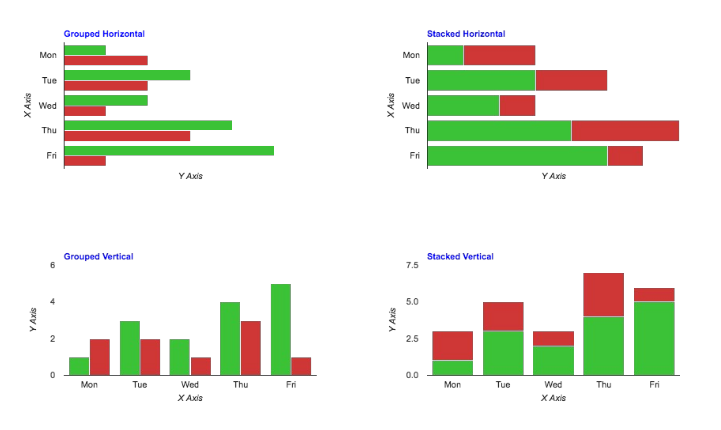
Bar charts are useful when the values of one axis are associated with a named item. Bar charts can be grouped or stacked, horizontal or vertical. The four examples here are all drawn using the same data. Only the chart type has been changed.
Notice that the X and Y axes switch positions for horizontal and vertical bar charts. This means that when you are setting up your chart you can ignore whether it will be drawn horizontally or vertically.
| Query Requirements | Column 1: Text Column 2: Numeric The query for each plot must return two columns, the first being the texts for the X axis, and the second being the values for the Y axis. You need to make sure the text returned in the first column fits along the X axis, using SQL date or string functions to format the text appropriately. |
| Multiple Plots | Yes Each plot has its own SQL query, a colour, a name, and a line style. |
| Axis Overrides | Y Axis Only You can override the Y axis limits calculated from the data series. Note that for stacked bar charts you will usually want to set Y minimum to zero. |
| Data Formatting | Y Axis Only Your query must format the X axis text to suit your requirements. The Y axis can be labelled automatically or with the number and format of labels you choose. |
| Extra Columns | Yes certainty, interval, scope, tooltip |
Bar Chart Ordering
Consider these three datasets:

Each dataset is sorted in ascending date order BUT not all dates are represented in all datasets, so the combined data is not in ascending date order.
By default, the bars will appear in the order that their values are encountered:
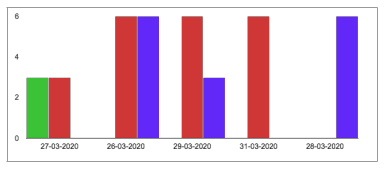
For some kinds of data this would be the expected behaviour.
When the X axis consists of dates, it obviously makes more sense to draw the bars in the correct order, so you can use Plotalot's barchart ordered option to sort the merged data before the chart is drawn:
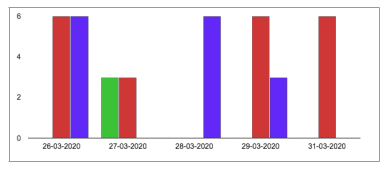
Beware, this is ordering by ascending text value, not by date, so you will need to make sure your chosen string date format enables this to work correctly.
Drawing a Bar Chart with Only One Data Value
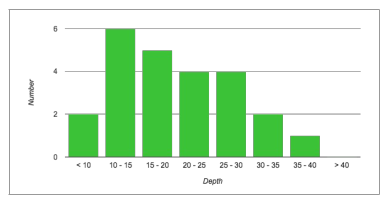
A table of historical dive information includes the maximum depth of the dive. We want a bar chart to show the relative frequency of dives to various depths.
For this purpose, only a single column of the table is relevant, the maximum depth. These are the values of that column from 24 rows:
13, 20, 26, 25, 22, 9, 13, 12, 18, 11, 32, 24, 19, 28, 32, 25, 22, 18, 15, 12, 9, 10, 18, 37In this example, we generate each bar of the graph with a separate query, and use UNION to return each result as a separate row of a single result set. The descriptive text for each bar (the X axis value) is hard coded as the first value of each sub-query.
SELECT '< 10', SUM(CASE WHEN `max_depth` < 10 THEN 1 ELSE 0 END) AS Y FROM `#__dive_details`
UNION
SELECT '10 - 15', SUM(CASE WHEN `max_depth` >= 10 AND `max_depth` < 15 THEN 1 ELSE 0 END) AS Y
FROM `#__dive_details`
UNION
SELECT '15 - 20', SUM(CASE WHEN `max_depth` >= 15 AND `max_depth` < 20 THEN 1 ELSE 0 END) AS Y
FROM `#__dive_details`
UNION
SELECT '20 - 25', SUM(CASE WHEN `max_depth` >= 20 AND `max_depth` < 25 THEN 1 ELSE 0 END) AS Y
FROM `#__dive_details`
UNION
SELECT '25 - 30', SUM(CASE WHEN `max_depth` >= 25 AND `max_depth` < 30 THEN 1 ELSE 0 END) AS Y
FROM `#__dive_details`
UNION
SELECT '30 - 35', SUM(CASE WHEN `max_depth` >= 30 AND `max_depth` < 35 THEN 1 ELSE 0 END) AS Y
FROM `#__dive_details`
UNION
SELECT '35 - 40', SUM(CASE WHEN `max_depth` >= 35 AND `max_depth` < 40 THEN 1 ELSE 0 END) AS Y
FROM `#__dive_details`
UNION
SELECT '> 40', SUM(CASE WHEN `max_depth` > 40 THEN 1 ELSE 0 END) AS Y FROM `#__dive_details`
And here's the chart: