Numeric Formatting
The easiest way to format numeric data is to use the MySql FORMAT function in your SQL query. For example, to format a number in a typical European format with two decimal places, you could use something like:
SELECT FORMAT(`column_name`, 2, 'de_DE');Note that the inclusion of dots and/or commas in the formatted number results in the column being determined as a string column. For Plotalot and Responsive tables this is fine and makes no difference. However for Google tables it does make a difference.
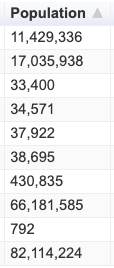
Google tables allow the front end user to dynamically sort columns by clicking on the column headings. When numbers with thousands separators are sorted as strings, the sort sequence is incorrect, as shown below.
To format a number in a typical European format with two decimal places, you would use something like:
var formatter = new
google.visualization.NumberFormat({decimalSymbol:',',groupingSymbol:'.'});
formatter.format(window.plotalot_chart_117_data, 3);
In this example the chart number is 117 and we are formatting the 4th column (counting from 0, so column 3). Here's another example, formatting a column as 12 digits without thousands separators:
var formatter = new
google.visualization.NumberFormat({pattern:'############'});
formatter.format(window.plotalot_chart_126_data, 3);
The parameters for the NumberFormat function are here:
https://developers.google.com/chart/interactive/docs/reference#numberformat