Combo Charts
Combo charts combine several different types of chart together. Each plot can be drawn as bars, lines, area, candlestick, or stepped area. Combo charts can be grouped or stacked. Stacked charts show bar and area data stacked. The examples here are drawn using the same data. The one on the left is stacked, the one on the right is grouped. Only the chart type has been changed.
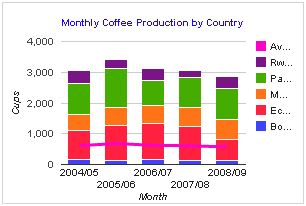
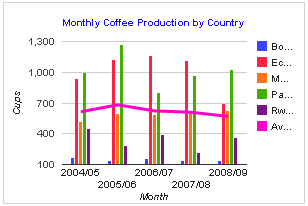
Combo charts can have text or numeric X axes, but the X values must be consistently text or numeric for all plots. If the X axis data is text, you need to make sure the text fits along the X axis, using SQL date or string functions to format the text appropriately. If the X data is numeric, the X axis formatting options can be used to select the way it is displayed. If the X data represents dates or time, it must be a Unix time value.
The Stepped Area plot type can only be used with text X data. It cannot be use with numeric X data.
Most plot types only require two columns, X and Y. Candlestick plots require 4 columns (minimum, open, close, maximum).
| Query Requirements |
Column 1: Text or Numeric - the X axis values Column 2: Numeric - the Y values Columns 3 - 5: Numeric, for candlestick plots |
| Multiple Plots | Yes |
| Axis Overrides |
Numeric X and Y If the X axis data is text, you cannot override the X axis limits. |
| Data Formatting |
Numeric X and Y You can apply formatting to the X and Y axis labels. For example if the X axis data represents Unix time (seconds since 1st January 1970), you can use the formatting options to display many different date or time formats. If the X axis data is text, you cannot apply formatting to the X axis labels. |
| Extra Columns |
Yes annotation, annotationText, certainty, emphasis, interval, scope, style, tooltip |
Hiding Legend Entries
For Combo charts only, you can hide individual legend entries by naming plots with a trailing tilda ( ~ ) character.