Candlestick Charts
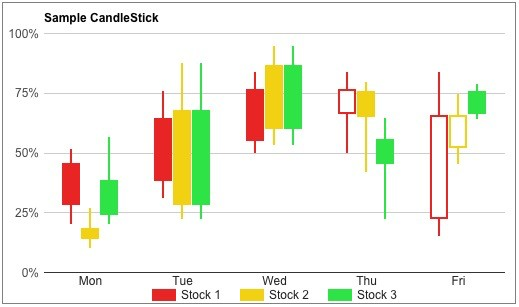
Candlestick charts are used to show daily stock prices, showing the open, close, minimum and maximum values. In this example, items where the open is less than the close (a gain) are drawn as filled boxes, and items where the close is less than the open (a loss) are drawn as hollow boxes.
| Query Requirements |
Column 1: Text or Numeric - the X axis values Column 2: Numeric - the minimum values Column 3: Numeric - the opening values Column 4: Numeric - the closing values Column 5: Numeric - the maximum values The query for each plot must return at least five columns, the first being the values for the X axis, and the next four being numeric. The X values must be consistently text or numeric for all plots. If the X axis data is text, you need to make sure the text fits along the X axis, using SQL date or string functions to format the text appropriately. If the X data is numeric, the X axis formatting options can be used to select the way it is displayed. If the X data represents dates or time, it must be a Unix time value. |
| Multiple Plots | Yes |
| Axis Overrides |
Numeric X and Y If the X axis data is text, you cannot override the X axis limits. |
| Data Formatting |
Numeric X and Y You can apply formatting to the X and Y axis labels. For example if the X axis data represents Unix time (seconds since 1st January 1970), you can use the formatting options to display many different date or time formats. If the X axis data is text, you cannot apply formatting to the X axis labels. |
| Extra Columns |
Yes tooltip |
You can select "ordered" to sort the X axis, although this only affects charts that use text for the X axis. See "Bar Chart Ordering" for more information.